---
title: "Deploy a Streamlit app"
description: "Deploy a Streamlit or Gradio app to an exe.dev VM: private behind exe.dev login, git push to deploy, data on a real disk, and LLMs with no API key."
url: https://exe-staging.dev/deploy/streamlit
category: "Frameworks"
updated: 2026-11-16
---
# Deploy a Streamlit app
Data apps that never sleep, private to your team. Gradio too.
- **Software:** Streamlit (https://streamlit.io)
- **Source:** https://github.com/streamlit/streamlit
- **License:** Apache-2.0
- **Time:** 10 minutes
- **Example VM name:** `my-streamlit` (yours will differ; on the VM, `hostname` prints it)
- **Machine-readable:** https://exe-staging.dev/deploy/streamlit/manifest.json
## What you get
- Your app, or a new Streamlit starter dashboard, running as `app.service` on 127.0.0.1:8000 and enabled to start after a reboot.
- `git push exe main` deploys: the hook builds a new release in `~/releases` with uv, runs a Streamlit app once headless with Streamlit's AppTest, switches `~/app` to it, restarts, and checks it answers. A failed deploy rejects the push and leaves the running version up.
- The app private behind exe.dev login, reading the viewer's email from the `X-ExeDev-Email` header (`st.context.headers` in Streamlit, `gr.Request` in Gradio).
- Settings and secrets outside the repository, mode 600, in `~/app.env` and `~/.streamlit/secrets.toml` (`st.secrets`).
- Data in `~/data`, refreshed every hour by `app-refresh.timer` in the starter, and backed up every night to `~/backups`, with a backup restored and checked in a scratch directory.
Running on the VM:
- **Your Streamlit app**: `streamlit run` on 127.0.0.1:8000, as `app.service` under systemd, port 8000, data in `~/app`
- **Python 3.13 and uv**: uv installs Python and your locked dependencies into `~/app/.venv`
- **SQLite**: the starter's data and its visitors' questions, data in `~/data`
- **Deploy hook**: `git push` installs, runs the app once headless, restarts, and checks; a failure rejects the push, data in `~/app.git`
- **Data refresh**: `app-refresh.timer` runs `refresh.py` every hour
- **Nightly backup**: a systemd timer; keeps two weeks, data in `~/backups`
How it is reached:
- https://my-streamlit.exe.xyz/ (private): your app, for you and the people you share it with
- my-streamlit.exe.xyz:app.git (private): `git push exe main` deploys
## Deploy with Shelley
Open https://exe-staging.dev/new?prompt=REPO%3D%3Cfill-this-in%3E%0A%0ASet%20up%20Streamlit%20on%20this%20VM%20by%20following%20the%20exe.dev%20recipe%20at%20https%3A%2F%2Fexe-staging.dev%2Fdeploy%2Fstreamlit.md%20from%20top%20to%20bottom.%0A%0AThe%20values%20at%20the%20top%20of%20this%20message%20are%20mine%3A%0A-%20REPO%3A%20the%20app%20to%20deploy%3A%20a%20GitHub%20repository%20%28owner%2Fname%20or%20a%20URL%29%2C%20a%20Hugging%20Face%20Space%20URL%2C%20or%20%60new%60%20to%20start%20from%20a%20small%20Streamlit%20dashboard%0AAsk%20me%20for%20any%20that%20still%20say%20%3Cfill-this-in%3E%20before%20you%20need%20them.%0A%0AThe%20recipe%27s%20example%20VM%20name%20is%20my-streamlit.%20This%20VM%27s%20name%20is%20the%20output%20of%20%60hostname%60%3A%20use%20it%20wherever%20the%20recipe%20writes%20my-streamlit.%20Skip%20the%20step%20that%20creates%20the%20VM%3B%20you%20are%20on%20it.%0A%0AYou%20are%20done%20when%20all%20of%20these%20are%20true.%20Check%20each%20one%20yourself%3A%0A-%20Your%20app%2C%20or%20a%20new%20Streamlit%20starter%20dashboard%2C%20running%20as%20%60app.service%60%20on%20127.0.0.1%3A8000%20and%20enabled%20to%20start%20after%20a%20reboot.%0A-%20%60git%20push%20exe%20main%60%20deploys%3A%20the%20hook%20builds%20a%20new%20release%20in%20%60~%2Freleases%60%20with%20uv%2C%20runs%20a%20Streamlit%20app%20once%20headless%20with%20Streamlit%27s%20AppTest%2C%20switches%20%60~%2Fapp%60%20to%20it%2C%20restarts%2C%20and%20checks%20it%20answers.%20A%20failed%20deploy%20rejects%20the%20push%20and%20leaves%20the%20running%20version%20up.%0A-%20The%20app%20private%20behind%20exe.dev%20login%2C%20reading%20the%20viewer%27s%20email%20from%20the%20%60X-ExeDev-Email%60%20header%20%28%60st.context.headers%60%20in%20Streamlit%2C%20%60gr.Request%60%20in%20Gradio%29.%0A-%20Settings%20and%20secrets%20outside%20the%20repository%2C%20mode%20600%2C%20in%20%60~%2Fapp.env%60%20and%20%60~%2F.streamlit%2Fsecrets.toml%60%20%28%60st.secrets%60%29.%0A-%20Data%20in%20%60~%2Fdata%60%2C%20refreshed%20every%20hour%20by%20%60app-refresh.timer%60%20in%20the%20starter%2C%20and%20backed%20up%20every%20night%20to%20%60~%2Fbackups%60%2C%20with%20a%20backup%20restored%20and%20checked%20in%20a%20scratch%20directory.%0A%0ARead%20the%20whole%20recipe%2C%20including%20the%20closed%20details%2C%20and%20follow%20%22Set%20up%0Aby%20hand%22%20in%20order%2C%20skipping%20VM%20creation.%20The%20walkthrough%20above%20it%20is%20for%0Athe%20owner%20afterwards.%20Ask%20for%20REPO%20first%20if%20it%20says%20%3Cfill-this-in%3E.%0AFor%20REPO%3Dnew%2C%20build%20the%20starter%20exactly%20as%20written.%20For%20a%20GitHub%0Arepository%20or%20a%20Hugging%20Face%20Space%2C%20follow%20%22Bring%20your%20app%22%3A%20set%0AAPP_FILE%20and%20the%20other%20settings%20in%20~%2Fapp.env%2C%20and%20for%20a%20Gradio%20app%0Achange%20ExecStart%20as%20it%20says.%20Never%20commit%20to%20the%20owner%27s%20repository%20or%0Apush%20to%20~%2Fapp.git%20%28run%20the%20hook%20by%20hand%20instead%29%2C%20so%20the%20owner%27s%20first%0Apush%20fast-forwards.%20Remove%20whatever%20you%20make%20only%20for%20testing.%20If%20a%0Aprivate%20GitHub%20repository%20can%27t%20be%20cloned%2C%20give%20the%20owner%20the%0A%60integrations%20add%20github%60%20command%20with%20this%20VM%27s%20name%20and%20wait%20for%20them.%0AIf%20the%20app%20needs%20API%20keys%20you%20don%27t%20have%2C%20say%20which%2C%20and%20where%20they%20go.%0ADon%27t%20reboot%2C%20don%27t%20make%20the%20VM%20public%2C%20and%20don%27t%20run%20the%20Restore%20steps%0Aon%20live%20data%3A%20test%20the%20backup%20in%20a%20scratch%20directory%20as%20written.%0AThe%20VM%20can%27t%20open%20its%20own%20https%3A%2F%2F%3Cvm%3E.exe.xyz%3B%20%22Check%20it%22%20tests%0Athrough%20localhost%20instead.%20Skip%20the%20optional%20sections%20%28Gradio%20next%20to%0AStreamlit%2C%20integrations%2C%20public%20access%29%20unless%20the%20owner%20asks.%0AFinish%20with%20https%3A%2F%2F%3Cvm%3E.exe.xyz%2F%20and%20only%20the%20one%20git%20command%20from%0A%22Deploy%20with%20git%20push%22%20that%20fits%3A%20%60git%20clone%20-o%20exe%60%20for%20REPO%3Dnew%2C%0A%60git%20remote%20add%20exe%60%20for%20a%20repository%2C%20plus%20the%20branch%20to%20push%20if%20it%0Aisn%27t%20main%2C%20and%20anything%20you%20adapted%20or%20that%20the%20owner%20should%20change.%0A%0AFinish%20with%20the%20URLs%20I%20should%20open%20and%20these%20commands%2C%20which%20only%20I%20can%20run%2C%20from%20my%20own%20computer%20%28with%20this%20VM%27s%20name%20in%20them%29%3A%0A%20%20git%20clone%20-o%20exe%20my-streamlit.exe.xyz%3Aapp.git%20%20%20%20%23%20if%20you%20started%20fresh%0A%20%20git%20remote%20add%20exe%20my-streamlit.exe.xyz%3Aapp.git%20%20%23%20or%2C%20in%20your%20own%20app%27s%20checkout%0A to create a VM whose agent, Shelley, follows this recipe. From a terminal:
```sh
curl -fsSL https://exe-staging.dev/deploy/streamlit/prompt.txt | ssh exe.dev new --prompt=/dev/stdin
```
Then, on your own computer:
```sh
git clone -o exe my-streamlit.exe.xyz:app.git # if you started fresh
git remote add exe my-streamlit.exe.xyz:app.git # or, in your own app's checkout
```
Or follow the steps below by hand.
Streamlit and Gradio turn a Python script into a web app: a dashboard over
your data, an internal tool, a model demo. This page gives that app a
home. One exe.dev VM runs it under systemd, keeps its data on a real
disk, and deploys every `git push`. exe.dev puts it on HTTPS behind its
own login, so it's private from the start, and it tells your app who is
looking, in the `X-ExeDev-Email` header: no passwords, no `st.login`
setup.
Unlike Streamlit Community Cloud or Hugging Face Spaces, nothing sleeps:
the app is up when your team opens it on Monday morning, with the caches
it built and the files it wrote still there. Scheduled jobs refresh the
data, LLM calls go through exe.dev's gateway with no API key on the VM,
and Shelley, the agent on the VM, can read the logs and fix the code.
Bring an app from GitHub or a Hugging Face Space, or start from a small
dashboard with all of that wired up.
## Open your app
When Shelley finishes, open `https://my-streamlit.exe.xyz/`. exe.dev asks
you to sign in, then shows the app. Only you can see it, until you
[share the VM](/docs/sharing).
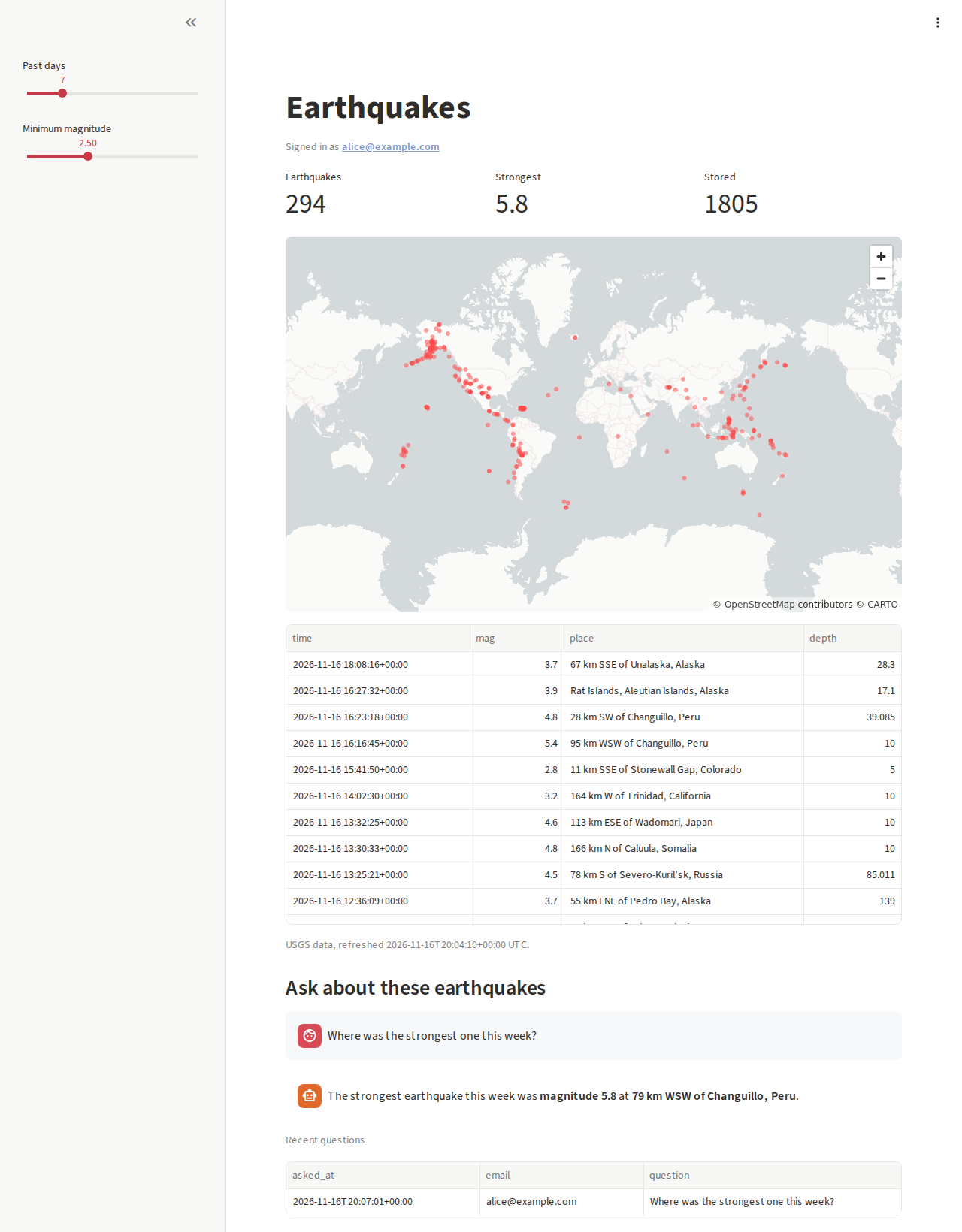
The starter is a dashboard of the past weeks' earthquakes, from the US
Geological Survey's public feed: a map, a table, and two sliders. Under
the title it says **Signed in as** and your email address: exe.dev's proxy
told the app who you are. Type a question in the box at the bottom, such
as "Where was the strongest one?", and an LLM answers from the table, with
no API key anywhere on the VM. Each question is saved with its asker in
SQLite, at `~/data/app.db`, and listed under **Recent questions**.
Every hour, a timer fetches the feed again and adds what's new to the
database, so the history grows past the feed's one week. The page shows
the new data on its next rerun; nobody restarts anything.
The starter: the viewer's email comes from exe.dev's proxy, and the answer from the LLM gateway.
## Deploy with git push
The VM keeps a Git repository at `~/app.git`. Pushing to it deploys. Add it
as a remote called `exe` on your computer. If you started fresh, clone it:
```bash
git clone -o exe my-streamlit.exe.xyz:app.git my-streamlit
cd my-streamlit
```
If you brought your own repository, add the remote to your checkout
instead:
```bash
git remote add exe my-streamlit.exe.xyz:app.git
```
Change something, commit, and push. In the starter, change the title in
`streamlit_app.py`:
```bash
git commit -am "Rename the dashboard"
git push exe main
```
(If your repository's branch is `master`, push `master`.) The deploy runs
inside the push, and its output comes back to you:
```text
remote: deploy: 4e1d2c9 (main)
remote: deploy: running streamlit_app.py once
remote: deploy: 4e1d2c9 is live at https://my-streamlit.exe.xyz/
```
The hook builds the commit in a new directory,
`~/releases/-`, with `uv sync --locked`. Then it runs the
app's script once, headless, with Streamlit's
[AppTest](https://docs.streamlit.io/develop/api-reference/app-testing), so
an exception on the first page load stops the deploy instead of greeting
your team. Then it points `~/app` at the new release, restarts the app (a
second or two without answers; open pages reconnect by themselves), and
waits for it to answer. If anything fails, the push ends with
`deploy: FAILED`, the error, and `! [remote rejected] main -> main
(pre-receive hook declined)`; the running version stays. Fix it and push
again.
To go back to an earlier version, push it:
```bash
git push -f exe 4e1d2c9:main
```
GitHub can stay your source of truth: `git push origin main` to share the
code, `git push exe main` to ship it.
> [!TIP]
> If `ssh my-streamlit.exe.xyz` works but the push can't connect, use
> `vm+my-streamlit@vm.exe.xyz:app.git` as the remote's address
> ([why](/docs/faq/ssh-destination)).
### Work on it locally
You need [uv](https://docs.astral.sh/uv/) on your computer. In your
checkout, `uv sync` installs the same Python and packages the VM uses. The
starter keeps a local database in `data/`, which Git ignores:
```bash
uv run refresh.py
uv run streamlit run streamlit_app.py
```
The LLM box needs exe.dev's gateway, which only answers on the VM. To try
it locally, set `LLM_BASE_URL=https://api.openai.com/v1` and
`OPENAI_API_KEY` to your own key.
## Share it, and know who's looking
The app is private: exe.dev's proxy sends anyone who isn't signed in, or
hasn't been given access, to a login page before a single request reaches
the VM. To let your team in, on your computer:
```bash
ssh exe.dev share add my-streamlit alice@example.com
ssh exe.dev share add my-streamlit team # everyone on your exe.dev team
ssh exe.dev share add-link my-streamlit # a link anyone can accept after signing in
```
They get the app and nothing else: no shell, no Shelley. See
[sharing](/docs/sharing) for the rest, including `share remove`.
For each signed-in viewer, the proxy adds `X-ExeDev-Email` and
`X-ExeDev-UserID` to every request, and removes any a visitor tried to send
themselves ([Login with exe](/docs/login-with-exe)). Streamlit shows a
session's headers in
[`st.context.headers`](https://docs.streamlit.io/develop/api-reference/caching-and-state/st.context),
which doesn't care about case:
```python
user = st.context.headers.get("X-ExeDev-Email")
```
So per-person behavior is a few lines. To keep a page for some of the
people you've shared with, put it in `pages/admin.py` (Streamlit makes it a
page of its own) and start it with:
```python
import os
import streamlit as st
ADMINS = set(os.environ.get("ADMIN_EMAILS", "").split(","))
if st.context.headers.get("X-ExeDev-Email") not in ADMINS:
st.error("This page is for admins.")
st.stop()
```
with `ADMIN_EMAILS=you@example.com,alice@example.com` in `~/app.env`
(then `sudo systemctl restart app`). The headers are those of the page's
WebSocket connection, made when the page loads, so they are the same for
the whole session. Gradio passes them to any event handler with a
[`gr.Request`](https://www.gradio.app/docs/gradio/request) parameter; see
[Gradio apps](#gradio-apps).
## Secrets and API keys
Streamlit apps read secrets with
[`st.secrets`](https://docs.streamlit.io/develop/concepts/connections/secrets-management),
from `.streamlit/secrets.toml`. On the VM, they go in
`~/.streamlit/secrets.toml`, outside the repository, so a deploy never
overwrites them and Git never sees them; Streamlit reads that file
wherever the app runs. It's mode 600. On the VM:
```bash
nano ~/.streamlit/secrets.toml
sudo systemctl restart app
```
What you'd paste into Community Cloud's **Secrets** box goes here,
unchanged:
```toml
WAREHOUSE_URL = "postgresql://reader:...@db.example.com/sales"
[connections.snowflake]
account = "..."
```
Plain environment variables, the way Spaces and most other platforms pass
secrets, go in `~/app.env`. Both files are in the nightly backup.
Better still, keep the key off the VM. exe.dev's
[HTTP proxy integration](/docs/integrations-http-proxy) stores a token on
exe.dev's side and adds it to each request the VM makes through it. For an
API that wants `Authorization: Bearer ...`, on your computer:
```bash
printf '%s' "$WEATHER_API_KEY" | ssh exe.dev integrations add http-proxy \
--name weather --target https://api.weather.example --bearer=- --attach vm:my-streamlit
```
The app then calls `https://weather.int.exe.xyz/...` with no key at all,
and a copy of the VM, a leaked backup, or a careless `st.write(st.secrets)`
has nothing to give away. For private GitHub repositories and LLMs there
are dedicated integrations, below; [Agent secrets](/deploy/agent-secrets)
shows the pattern at length.
## Refresh data on a schedule
A dashboard is only as fresh as its data. Instead of fetching it while
someone waits, let a timer do it: `app-refresh.timer` runs `refresh.py`
from the live release every hour, as you, with `~/app.env` and the app's
virtualenv, and does nothing if there's no `refresh.py`. In the starter, it
adds the USGS feed to SQLite. Yours can pull from a warehouse, an API, or
a spreadsheet, and write a database or a Parquet file in `~/data`.
On the VM, run it now, and see when it runs next and what it said last:
```bash
sudo systemctl start app-refresh
journalctl -u app-refresh -n 5 --no-pager
systemctl list-timers app-refresh.timer
```
The app picks up new data through its cache key. The starter caches the
dataframe with `@st.cache_data` on the time of the last refresh, so the
first rerun after a refresh loads it again, and every other rerun is
free:
```python
@st.cache_data
def load(refreshed: str) -> pd.DataFrame: ...
refreshed = con.execute("SELECT max(fetched_at) FROM quakes").fetchone()[0]
quakes = load(refreshed)
```
For a different schedule, change `OnCalendar=` in
`/etc/systemd/system/app-refresh.timer`, for example to
`Mon..Fri 06:00` or `*:0/15` (every 15 minutes), and run
`sudo systemctl daemon-reload`. Times are UTC.
## Call an LLM
exe.dev's [LLM integration](/docs/integrations-llm) answers at
`https://llm.int.exe.xyz` from your VM, with no API key: the VM is the
credential, and usage is billed to your exe.dev account. It speaks the
OpenAI API (and Anthropic's), so the OpenAI SDK works with a different
`base_url`. The starter's question box is this, with
[`st.write_stream`](https://docs.streamlit.io/develop/api-reference/write-magic/st.write_stream)
showing the answer as it arrives:
```python
from openai import OpenAI
llm = OpenAI(base_url="https://llm.int.exe.xyz/v1", api_key="unused")
if question := st.chat_input("Where was the strongest one?"):
stream = llm.chat.completions.create(
model="gpt-5.4-mini",
messages=[{"role": "user", "content": question}],
stream=True,
)
answer = st.chat_message("assistant").write_stream(stream)
```
On the VM, `curl -s https://llm.int.exe.xyz/v1/models` lists the models
you can use: OpenAI's, Anthropic's, and open models through Fireworks.
Anthropic's SDK works the same way, with `base_url="https://llm.int.exe.xyz"`.
For a chat UI with no code at all, see [Open WebUI](/deploy/open-webui).
## Gradio apps
[Gradio](https://www.gradio.app) is the other way to put a Python function
in a browser, and the SDK behind most Hugging Face Spaces. It needs even
less setup here: `demo.launch()` listens on 127.0.0.1:7860 by default, and
exe.dev's proxy serves every port from 3000 to 9999, so a Gradio app on
the VM is at `https://my-streamlit.exe.xyz:7860/` as soon as it starts,
behind the same login. Gradio's own settings, for `launch()` or as
environment variables:
- `server_name` (`GRADIO_SERVER_NAME`): leave it at `127.0.0.1`. Spaces set
`0.0.0.0`; you don't need to.
- `server_port` (`GRADIO_SERVER_PORT`): 7860, or 8000 to make it the
VM's main app at `https://my-streamlit.exe.xyz/`.
- `root_path` (`GRADIO_ROOT_PATH`): only if the app is served under a
path, such as `/chat` behind your own nginx. Gradio builds its URLs
from the proxy's `X-Forwarded-Host` and `X-Forwarded-Proto`, so at the
root of a port it needs nothing.
- `share=True` would open a public `gradio.live` tunnel past exe.dev's
login. Leave it off; [share the VM](/docs/sharing) instead.
A handler that takes a `gr.Request` gets the viewer's headers:
```python
def chat(message, history, request: gr.Request):
user = request.headers.get("x-exedev-email")
```
### A Gradio app next to Streamlit
This runs a chat app with the LLM gateway on port 7860, as its own
service, alongside the Streamlit app. On the VM:
```bash
mkdir -p ~/chat && cd ~/chat
uv init -q --no-package --no-readme --python 3.13 --name chat
rm -f main.py
uv add -q "gradio>=6.32,<7" openai
cat > app.py <<'EOF'
"""A Gradio chat app on exe.dev: the LLM gateway, and the viewer's email."""
import gradio as gr
from openai import OpenAI
llm = OpenAI(base_url="https://llm.int.exe.xyz/v1", api_key="unused")
def chat(message, history, request: gr.Request):
user = request.headers.get("x-exedev-email", "someone")
messages = [{"role": "system", "content": f"You are talking to {user}."}]
messages += [{"role": m["role"], "content": m["content"]} for m in history]
messages.append({"role": "user", "content": message})
reply = ""
stream = llm.chat.completions.create(model="gpt-5.4-mini", messages=messages, stream=True)
for chunk in stream:
if chunk.choices and chunk.choices[0].delta.content:
reply += chunk.choices[0].delta.content
yield reply
demo = gr.ChatInterface(chat, title="Ask anything")
demo.launch(server_name="127.0.0.1", server_port=7860)
EOF
sudo tee /etc/systemd/system/chat.service >/dev/null <<'EOF'
[Unit]
Description=Gradio chat app in ~/chat
After=network-online.target
Wants=network-online.target
[Service]
User=exedev
WorkingDirectory=/home/exedev/chat
Environment=PYTHONUNBUFFERED=1 GRADIO_ANALYTICS_ENABLED=False
ExecStart=/home/exedev/chat/.venv/bin/python app.py
Restart=always
RestartSec=3
[Install]
WantedBy=multi-user.target
EOF
sudo systemctl daemon-reload
sudo systemctl enable --now chat.service
sleep 10; curl -s -o /dev/null -w '%{http_code}\n' http://localhost:7860/
```
Expect `200`. Open `https://my-streamlit.exe.xyz:7860/` and ask "What's
my email address?". After editing `app.py`, `sudo systemctl restart chat`.
Other ports are always private, even if you make port 8000 public, and
the people you've shared the VM with can open them too.
### From Hugging Face Spaces
A Gradio Space is a Git repository: `app.py` (or the file its README's
`app_file` names), `requirements.txt`, and a README whose front matter
says which Gradio and Python to use. Bring it like any other app: give
Shelley the Space's URL as REPO, or follow
[Bring your app](#bring-your-app) by hand, which clones it with:
```bash
git clone --bare https://huggingface.co/spaces/OWNER/NAME ~/app.git
```
Then, on your computer, clone the Space, add the VM as a remote, and push
there to deploy: `git remote add exe my-streamlit.exe.xyz:app.git`. Things
to know:
- **Settings.** Spaces install Gradio for you, so a Space's
`requirements.txt` usually lacks it: `EXTRA_PACKAGES=gradio==` in
`~/app.env` adds it. Spaces' Python defaults to 3.10; set `PYTHON` to
the README's `python_version` if it has one. The Space's secrets and
variables go in `~/app.env` too.
- **System packages.** For a `packages.txt`, run
`xargs -a packages.txt sudo apt-get install -y` on the VM once.
- **Models.** The VM has no GPU. ZeroGPU's `@spaces.GPU` does nothing
outside Spaces, so small models run on the CPU, and their downloads
stay cached in `~/.cache/huggingface` across restarts. A model that
needs a GPU should run elsewhere, behind an API the app calls.
- **Large files.** Files a Space keeps in Git LFS reach the VM as
small pointer files, since the hook copies the repository with
`git archive`. Download them at startup with `huggingface_hub`
instead, which most Spaces already do for their models.
## Make it public (optional)
A demo for the world, or a dashboard for people without exe.dev accounts?
On your computer:
```bash
ssh exe.dev share set-public my-streamlit
```
Now anyone can open `https://my-streamlit.exe.xyz/`, and `X-ExeDev-Email`
arrives only for visitors who have signed in on this host. Offer them a
sign-in link where you need to know who they are:
```python
user = st.context.headers.get("X-ExeDev-Email")
if not user:
st.link_button("Sign in", "/__exe.dev/login?redirect=/")
st.stop()
```
Only port 8000 can be public; a Gradio app on 7860 stays private.
`ssh exe.dev share set-private my-streamlit` closes the door again. For
your own domain, see [custom domains](/docs/cnames).
## Ask Shelley
Shelley, the agent on your VM, is at `https://my-streamlit.shelley.exe.xyz/`.
It can read `journalctl -u app`, the deploy hook, and your code, so "my
last push failed, why?" or "add a page with the strongest earthquakes per
country" are fine requests. Ask it to work in a clone of `~/app.git` and
deploy with `git push`, like you do; then `git pull exe main` brings its
commits to your computer.
## The nuts and bolts
Happy with what Shelley set up? You can stop here. These are the steps it
followed, and the maintenance commands for later. Tested with Streamlit
1.67.0, Gradio 6.32.0, and uv 0.13.8 on Python 3.13.
Set up by hand
### Create the VM
On your computer (pick another name if `my-streamlit` is taken):
```bash
ssh exe.dev new --name=my-streamlit
ssh my-streamlit.exe.xyz
```
Everything else runs **on the VM**, as `exedev`.
### Prepare the VM
uv is preinstalled. Install Python 3.13 with it, and make the directories
for data, backups, and scripts. Then create the app's settings,
`~/app.env`, and its secrets, `~/.streamlit/secrets.toml`, once:
```bash
uv python install 3.13
mkdir -p ~/data ~/backups ~/bin ~/.streamlit
if [ ! -e ~/app.env ]; then
install -m 600 /dev/null ~/app.env
cat >> ~/app.env < ~/bin/app-backup <<'EOF'
#!/bin/bash
# Back up ~/data, ~/app.env and ~/.streamlit/secrets.toml to
# ~/backups/app--.tar.gz. SQLite databases (*.db) are copied
# with .backup, safe while the app runs. Keeps the 14 newest backups of
# each kind. Usage: app-backup [nightly|manual]
set -euo pipefail
umask 077
kind=${1:-manual}
work=$(mktemp -d)
trap 'rm -rf "$work"' EXIT
mkdir -p "$HOME/backups" "$work/data"
rsync -a --exclude='*.db' --exclude='*.db-wal' --exclude='*.db-shm' "$HOME/data/" "$work/data/"
for db in "$HOME"/data/*.db; do
[ -e "$db" ] || continue
copy="$work/data/$(basename "$db")"
sqlite3 "$db" ".backup '$copy'"
[ "$(sqlite3 "$copy" 'PRAGMA integrity_check')" = ok ]
done
cp "$HOME/app.env" "$HOME/.streamlit/secrets.toml" "$work/"
out="$HOME/backups/app-$kind-$(date -u +%Y%m%d-%H%M%S).tar.gz"
tar -czf "$out.part" -C "$work" .
mv "$out.part" "$out"
ls -1t "$HOME/backups/app-$kind-"*.tar.gz | tail -n +15 | xargs -r rm --
echo "$out"
EOF
chmod +x ~/bin/app-backup
```
Run it every night at about 03:30 UTC:
```bash
sudo tee /etc/systemd/system/app-backup.service >/dev/null <<'EOF'
[Unit]
Description=Back up ~/data, ~/app.env and secrets to ~/backups
[Service]
Type=oneshot
User=exedev
ExecStart=/home/exedev/bin/app-backup nightly
EOF
sudo tee /etc/systemd/system/app-backup.timer >/dev/null <<'EOF'
[Unit]
Description=Back up the app every night
[Timer]
OnCalendar=*-*-* 03:30:00
RandomizedDelaySec=30m
Persistent=true
[Install]
WantedBy=timers.target
EOF
sudo systemctl daemon-reload
sudo systemctl enable --now app-backup.timer
systemctl list-timers app-backup.timer
```
The timer should show its next run.
### Run the app with systemd
exe.dev's [HTTPS proxy](/docs/proxy) sends `https://.exe.xyz/` to port
8000 and reaches it on 127.0.0.1, so the app listens there and nowhere
else. The proxy carries Streamlit's WebSocket as it is, so the rest of
Streamlit's defaults stay: CORS and XSRF protection on (uploads work,
since the page and the server share an address) and no `baseUrlPath`.
The flags turn off the file watcher, since a deploy restarts the app
anyway, and Streamlit's usage statistics. Flags on the command line win
over a repository's `.streamlit/config.toml`, so its theme still
applies:
```bash
sudo tee /etc/systemd/system/app.service >/dev/null <<'EOF'
[Unit]
Description=Streamlit app in ~/app
After=network-online.target
Wants=network-online.target
StartLimitIntervalSec=0
[Service]
User=exedev
WorkingDirectory=/home/exedev/app
EnvironmentFile=/home/exedev/app.env
Environment=PYTHONUNBUFFERED=1
ExecStart=/home/exedev/app/.venv/bin/streamlit run ${APP_FILE} --server.address 127.0.0.1 --server.port 8000 --server.headless true --server.fileWatcherType none --browser.gatherUsageStats false
Restart=always
RestartSec=3
TimeoutStopSec=20
[Install]
WantedBy=multi-user.target
EOF
sudo systemctl daemon-reload
sudo systemctl enable app.service
```
It starts with the first deploy. The data refresh is a oneshot service
and an hourly timer; `ConditionPathExists` skips it for apps without a
`refresh.py`:
```bash
sudo tee /etc/systemd/system/app-refresh.service >/dev/null <<'EOF'
[Unit]
Description=Refresh the app's data with ~/app/refresh.py
ConditionPathExists=/home/exedev/app/refresh.py
[Service]
Type=oneshot
User=exedev
WorkingDirectory=/home/exedev/app
EnvironmentFile=/home/exedev/app.env
Environment=PYTHONUNBUFFERED=1
ExecStart=/home/exedev/app/.venv/bin/python refresh.py
EOF
sudo tee /etc/systemd/system/app-refresh.timer >/dev/null <<'EOF'
[Unit]
Description=Refresh the app's data every hour
[Timer]
OnCalendar=hourly
RandomizedDelaySec=5m
Persistent=true
[Install]
WantedBy=timers.target
EOF
sudo systemctl daemon-reload
sudo systemctl enable --now app-refresh.timer
```
### Add the deploy hook
Create the repository you'll push to. To start fresh:
```bash
git init --bare -b main ~/app.git
```
To bring your app, clone it from GitHub (or a Hugging Face Space) instead,
with your repository in place of `OWNER/NAME`:
```bash
git clone --bare https://github.com/OWNER/NAME.git ~/app.git
```
If that asks for a password, the repository is private. On your
computer, connect it with the [GitHub integration](/docs/integrations-github),
then clone through the integration, with no token on the VM:
```bash
ssh exe.dev integrations add github --name NAME --repository OWNER/NAME --attach vm:my-streamlit
```
```bash
git clone --bare https://github.int.exe.xyz/OWNER/NAME.git ~/app.git
```
The branch `HEAD` points to (`main`, usually) is the one that deploys;
pushes to other branches are stored but not deployed. Now the hook:
```bash
cat > ~/app.git/hooks/pre-receive <<'EOF'
#!/bin/bash
# Deploys each push to the deploy branch before git accepts it, or the
# branch as it is when run by hand. Builds it in a new
# ~/releases/-: installs dependencies with uv and runs a
# Streamlit app once, headless, with AppTest. Then points ~/app at the new
# release, restarts app.service, and waits for an answer. Any failure
# rejects the push, and ~/app stays on (or goes back to) the running release.
set -Eeuo pipefail
by_git=${GIT_DIR:+yes} # git sets GIT_DIR for hooks, so this is a push
export GIT_DIR=$HOME/app.git PATH=$HOME/.local/bin:/usr/local/bin:/usr/bin:/bin
branch=$(git symbolic-ref --short HEAD)
exec 9>"$GIT_DIR/deploy.lock" && flock 9 # one deploy at a time
new=$(git rev-parse -q --verify "refs/heads/$branch" || true)
if [ -n "$by_git" ]; then
now=${new:-0000000000000000000000000000000000000000} new=
while read -r was sha ref; do
if [ "$ref" = "refs/heads/$branch" ]; then new=$sha from=$was; fi
done
if [ -z "$new" ]; then echo "deploy: only pushes to $branch deploy"; exit 0; fi
if [[ $new =~ ^0+$ ]]; then echo "deploy: $branch can't be deleted"; exit 1; fi
if [ "$from" != "$now" ]; then echo "deploy: $branch moved; pull and push again"; exit 1; fi
fi
old=$(readlink "$HOME/app" || true) # the live release
release=$HOME/releases/$(date -u +%Y%m%d-%H%M%S)-${new:0:12}
echo "deploy: ${new:0:7} ($branch)"
mkdir -p "$HOME/releases" && mkdir "$release"
trap 'rm -rf "$release"; echo "deploy: FAILED; the live version is unchanged" >&2' ERR
git archive "$new" | tar -x -C "$release"
unset GIT_DIR GIT_QUARANTINE_PATH GIT_OBJECT_DIRECTORY GIT_ALTERNATE_OBJECT_DIRECTORIES
cd "$release"
set -a; . "$HOME/app.env"; set +a
if [ -f uv.lock ]; then uv sync -q --locked --no-dev
elif [ -f pyproject.toml ]; then uv sync -q --no-dev
else uv venv -q --python "${PYTHON:-3.13}"
if [ -f requirements.txt ]; then uv pip install -q -r requirements.txt; fi
fi
if [ -n "${EXTRA_PACKAGES:-}" ]; then uv pip install -q $EXTRA_PACKAGES; fi
if [ -x .venv/bin/streamlit ] && [ "${SMOKE_TEST:-yes}" != no ]; then
echo "deploy: running $APP_FILE once"
.venv/bin/python - 2>/dev/null <<'PY'
import os, sys
from streamlit.testing.v1 import AppTest
at = AppTest.from_file(os.path.abspath(os.environ["APP_FILE"]), default_timeout=60).run()
for e in at.exception:
print(f"deploy: {e.proto.type}: {e.message}")
print("\n".join(e.stack_trace[-2:]))
sys.exit(1 if at.exception else 0)
PY
fi
trap - ERR
go_live() { # point ~/app at a release, restart, wait 30 s for an answer below 500
ln -sfn "$1" "$HOME/app.next" && mv -T "$HOME/app.next" "$HOME/app"
since=$(date +%s)
sudo systemctl restart app.service
for _ in $(seq 30); do
sleep 1
code=$(curl -s -o /dev/null -w '%{http_code}' http://localhost:8000/) || true
[ "$code" -ge 200 ] && [ "$code" -lt 500 ] && return 0
done
return 1
}
if ! go_live "$release"; then
echo "deploy: no answer on port 8000. The end of journalctl -u app:" >&2
journalctl -u app.service --since "@$since" -o cat | tail -n 8 >&2 || true
if [ -z "$old" ]; then echo "deploy: FAILED; fix it and deploy again" >&2; exit 1; fi
go_live "$old" || true
rm -rf "$release"
echo "deploy: FAILED; back to ${old: -12:7}" >&2
exit 1
fi
ls -1d "$HOME"/releases/*/ | head -n -3 | xargs -r rm -rf # keep three
echo "deploy: ${new:0:7} is live at https://$(hostname).exe.xyz/"
EOF
chmod +x ~/app.git/hooks/pre-receive
```
`~/app` is a link to the live release: `readlink ~/app` shows which, and
the hook keeps the three newest in `~/releases`. Now follow
[Start fresh](#start-fresh) or [Bring your app](#bring-your-app).
### Start fresh
The starter is the earthquake dashboard: a uv project with Streamlit,
pandas, and the OpenAI SDK, made in a scratch directory:
```bash
rm -rf /tmp/starter && mkdir /tmp/starter && cd /tmp/starter
git init -q -b main
uv init -q --no-package --no-readme --python 3.13 --name "$(hostname)"
rm -f main.py
uv add -q "streamlit>=1.67,<2" pandas openai
```
The database, in `store.py`, is shared by the page and the refresh job:
```bash
cat > store.py <<'EOF'
"""The app's SQLite database: DATA_DIR/app.db (~/data on the VM, data/ locally)."""
import os
import sqlite3
from pathlib import Path
DATA_DIR = Path(os.environ.get("DATA_DIR", "data"))
def connect() -> sqlite3.Connection:
DATA_DIR.mkdir(parents=True, exist_ok=True)
con = sqlite3.connect(DATA_DIR / "app.db", timeout=10)
con.execute("PRAGMA journal_mode=WAL") # readers don't wait for the refresh
con.executescript(
"""
CREATE TABLE IF NOT EXISTS quakes (
id TEXT PRIMARY KEY, time TEXT, latitude REAL, longitude REAL,
depth REAL, mag REAL, place TEXT, type TEXT, fetched_at TEXT);
CREATE TABLE IF NOT EXISTS questions (
asked_at TEXT, email TEXT, question TEXT, answer TEXT);
"""
)
return con
EOF
```
`refresh.py` adds the past week of earthquakes to it, keeping each by its
USGS id, so the history grows past the feed's week:
```bash
cat > refresh.py <<'EOF'
"""Add the past week of earthquakes from USGS to SQLite. app-refresh.timer runs this hourly."""
from contextlib import closing
from datetime import UTC, datetime
import pandas as pd
from store import connect
FEED = "https://earthquake.usgs.gov/earthquakes/feed/v1.0/summary/all_week.csv"
COLUMNS = ["id", "time", "latitude", "longitude", "depth", "mag", "place", "type"]
df = pd.read_csv(FEED, usecols=COLUMNS)[COLUMNS]
df["fetched_at"] = datetime.now(UTC).isoformat(timespec="seconds")
rows = df.astype(object).where(df.notna(), None).itertuples(index=False)
with closing(connect()) as con, con:
con.executemany("INSERT OR REPLACE INTO quakes VALUES (?, ?, ?, ?, ?, ?, ?, ?, ?)", rows)
total = con.execute("SELECT count(*) FROM quakes").fetchone()[0]
print(f"{len(df)} earthquakes this week; {total} stored")
EOF
```
The page, `streamlit_app.py`, the file name Streamlit Community Cloud
looks for first:
```bash
cat > streamlit_app.py <<'EOF'
"""Earthquakes: a starter Streamlit app on exe.dev.
refresh.py keeps earthquakes from USGS in SQLite; this page maps them and
answers questions about them with an LLM through exe.dev's gateway.
"""
import os
from contextlib import closing
from datetime import UTC, datetime
import pandas as pd
import streamlit as st
from openai import OpenAI
from store import connect
st.set_page_config(page_title="Earthquakes", page_icon="🌍", layout="wide")
# exe.dev's proxy says who is looking, in a header on every request.
user = st.context.headers.get("X-ExeDev-Email")
# exe.dev's LLM gateway needs no key on the VM. Locally, set LLM_BASE_URL
# to a provider's API and OPENAI_API_KEY to your key.
llm = OpenAI(
base_url=os.environ.get("LLM_BASE_URL", "https://llm.int.exe.xyz/v1"),
api_key=os.environ.get("OPENAI_API_KEY", "unused"),
)
@st.cache_data(show_spinner=False)
def load(refreshed: str) -> pd.DataFrame:
"""Every stored earthquake; cached until the next refresh changes `refreshed`."""
with closing(connect()) as con:
df = pd.read_sql("SELECT * FROM quakes", con)
df["time"] = pd.to_datetime(df["time"], utc=True, format="ISO8601")
return df.sort_values("time", ascending=False)
st.title("Earthquakes")
st.caption(f"Signed in as **{user}**" if user else "Not signed in")
with closing(connect()) as con:
refreshed = con.execute("SELECT max(fetched_at) FROM quakes").fetchone()[0]
if refreshed is None:
st.info("No data yet. On the VM, run `sudo systemctl start app-refresh`.")
st.stop()
quakes = load(refreshed)
days = st.sidebar.slider("Past days", 1, 30, 7)
min_mag = st.sidebar.slider("Minimum magnitude", 0.0, 7.0, 2.5, 0.5)
since = pd.Timestamp.now(tz="UTC") - pd.Timedelta(days=days)
shown = quakes[(quakes["time"] >= since) & (quakes["mag"] >= min_mag)]
a, b, c = st.columns(3)
a.metric("Earthquakes", len(shown))
b.metric("Strongest", f"{shown['mag'].max():.1f}" if len(shown) else "none")
c.metric("Stored", len(quakes))
st.map(shown.assign(radius=shown["mag"] * 20_000), size="radius", color="#ff4b4b88")
st.dataframe(shown[["time", "mag", "place", "depth"]], hide_index=True)
st.caption(f"USGS data, refreshed {refreshed} UTC.")
st.subheader("Ask about these earthquakes")
if question := st.chat_input("Where was the strongest one?"):
st.chat_message("user").write(question)
table = shown.head(300)[["time", "mag", "place", "depth"]].to_csv(index=False)
stream = llm.chat.completions.create(
model=os.environ.get("LLM_MODEL", "gpt-5.4-mini"),
messages=[
{"role": "system", "content": "Answer briefly from this table:\n" + table},
{"role": "user", "content": question},
],
stream=True,
)
answer = st.chat_message("assistant").write_stream(stream)
with closing(connect()) as con, con:
asked_at = datetime.now(UTC).isoformat(timespec="seconds")
con.execute("INSERT INTO questions VALUES (?, ?, ?, ?)", (asked_at, user, question, answer))
with closing(connect()) as con:
recent = pd.read_sql(
"SELECT asked_at, email, question FROM questions ORDER BY asked_at DESC LIMIT 10", con
)
if len(recent):
st.caption("Recent questions")
st.dataframe(recent, hide_index=True)
EOF
```
Ignore what shouldn't be committed, commit, and push to `~/app.git`.
That runs the hook: the first deploy. Then fetch the data once:
```bash
cat > .gitignore <<'EOF'
__pycache__/
*.py[oc]
.venv/
.env
data/
.streamlit/secrets.toml
EOF
git add .gitignore .python-version pyproject.toml uv.lock store.py refresh.py streamlit_app.py
git -c user.name="$(hostname)" -c user.email="exedev@$(hostname).exe.xyz" commit -q -m "Streamlit starter"
git push -q ~/app.git main && cd ~ && rm -rf /tmp/starter
sudo systemctl start app-refresh.service
journalctl -u app-refresh -n 3 -o cat --no-pager
```
Expect `deploy: ... is live at https://...` from the push, and a line like
`1843 earthquakes this week; 1843 stored` from the refresh. Continue with
[Check it](#check-it).
### Bring your app
The hook already knows uv projects (`uv.lock` or `pyproject.toml`) and
`requirements.txt`, the files Streamlit Community Cloud and Spaces use.
Check what else your app expects, in its README and on the platform it
came from:
- **The script.** Set `APP_FILE` in `~/app.env` to the file Streamlit runs
(the "Main file path" on Community Cloud), relative to the repository's
top, such as `app/dashboard.py`.
- **Python.** uv uses the version in `.python-version` or
`requires-python`. For a project with only `requirements.txt`, set
`PYTHON=3.12` (say) in `~/app.env`; Community Cloud shows the app's
version in its settings.
- **Secrets and settings.** Copy Community Cloud's **Secrets** into
`~/.streamlit/secrets.toml`; put environment variables in
`~/app.env`. Point databases and files the app writes into `~/data`
(`DATA_DIR` is set there); anything written inside `~/app` is lost at
the next deploy.
- **System packages.** For a `packages.txt`, run
`xargs -a packages.txt sudo apt-get install -y` once.
- **A Gradio app** (or a Gradio Space): it runs with Python rather than
`streamlit run`. In `/etc/systemd/system/app.service`, make the
`ExecStart` line `ExecStart=/home/exedev/app/.venv/bin/python ${APP_FILE}`,
then `sudo systemctl daemon-reload`, and add to `~/app.env`:
`APP_FILE=app.py` (the Space's `app_file`),
`GRADIO_SERVER_PORT=8000`, `GRADIO_ANALYTICS_ENABLED=False`, and for a
Space `EXTRA_PACKAGES=gradio==`. If `launch()` names a
port, change it to 8000 or delete it. See
[From Hugging Face Spaces](#from-hugging-face-spaces).
- **A data refresh.** The timer runs `refresh.py` at the top of the
repository, if there is one. Point `ExecStart` in
`/etc/systemd/system/app-refresh.service` at another script if you
have one.
Then deploy it once:
```bash
~/app.git/hooks/pre-receive
```
Expect `deploy: ... is live at https://...`. If the headless run fails,
the error is above it: often a missing secret or package. If the app
doesn't answer, `journalctl -u app -n 50` says why. Fix it, and run the
hook again.
### Check it
```bash
systemctl is-active app.service
systemctl is-enabled app.service app-backup.timer app-refresh.timer
curl -s http://localhost:8000/_stcore/health; echo
curl -s -o /dev/null -w '%{http_code}\n' http://localhost:8000/
```
Expect `active`, `enabled` three times, `ok` (Streamlit's health check;
a Gradio app answers `{"detail":"Not Found"}` there, which is fine), and `200`. Then open
`https://.exe.xyz/` in a browser. `sudo reboot`, wait a minute,
reconnect, and the same checks pass.
### Test a backup
Make a backup and restore it into a scratch directory:
```bash
sudo systemctl start app-backup.service
latest=$(ls -1t ~/backups/app-nightly-*.tar.gz | head -n 1)
rm -rf /tmp/restore-test && mkdir /tmp/restore-test
tar -xzf "$latest" -C /tmp/restore-test
ls -a /tmp/restore-test /tmp/restore-test/data
for db in /tmp/restore-test/data/*.db; do
[ -e "$db" ] && sqlite3 "$db" 'PRAGMA integrity_check' && sqlite3 "$db" .tables
done
rm -rf /tmp/restore-test
```
Expect `app.env`, `secrets.toml`, the `data` directory, and for each
database `ok` and its tables (the starter's are `questions` and `quakes`).
Setup is done: continue with [Open your app](#open-your-app).
Back up and restore
On the VM, `~/bin/app-backup` makes a backup now and prints its path. Each
archive holds `data/` (each SQLite database as a consistent copy),
`app.env`, and `secrets.toml`. A backup on the VM won't help if you lose
the VM, so copy them off now and then. On your computer:
```bash
scp -r my-streamlit.exe.xyz:backups my-streamlit-backups
```
They hold your app's secrets, so keep them private. For a copy of the
whole VM, `ssh exe.dev cp my-streamlit my-streamlit-copy` works too.
### Restore
Pick a backup and use its name below. On a new VM, first follow
[Set up by hand](#create-the-vm) up to your first deploy, then copy the
archive over from your computer:
```bash
scp my-streamlit-backups/app-nightly-20261116-033012.tar.gz my-streamlit.exe.xyz:backups/
```
On the VM, stop the app and the refresh, set the current data aside, and
unpack:
```bash
backup=~/backups/app-nightly-20261116-033012.tar.gz
sudo systemctl stop app.service app-refresh.timer
mv ~/data ~/data.before-restore-$(date +%s)
rm -rf /tmp/restore && mkdir /tmp/restore && tar -xzf "$backup" -C /tmp/restore
mv /tmp/restore/data ~/data
diff /tmp/restore/app.env ~/app.env
diff /tmp/restore/secrets.toml ~/.streamlit/secrets.toml
```
If `diff` shows settings or secrets you need from the backup (on a new VM,
you do), copy them: `install -m 600 /tmp/restore/app.env ~/app.env` and
`install -m 600 /tmp/restore/secrets.toml ~/.streamlit/secrets.toml`.
Then start again:
```bash
sudo systemctl start app.service app-refresh.timer
sleep 5; curl -s -o /dev/null -w '%{http_code}\n' http://localhost:8000/
rm -rf /tmp/restore
```
Expect `200`, and your data in the app. Delete `~/data.before-restore-*`
once you're happy.
Update Streamlit, Python, and the rest
Updates travel through Git like any other change. On your computer:
- **Packages:** `uv lock --upgrade-package streamlit` (or `--upgrade` for
everything), try it with `uv run streamlit run streamlit_app.py`, commit
`uv.lock`, and push. Streamlit's
[release notes](https://docs.streamlit.io/develop/quick-reference/release-notes)
list what changed; the hook's headless run catches the crashes.
- **Python:** change `.python-version` (to `3.14`, say) and
`requires-python` in `pyproject.toml`, run `uv lock`, commit, and push.
The hook's `uv sync` downloads that Python for the new release.
On the VM:
- **A Gradio app next to Streamlit:** `cd ~/chat && uv lock --upgrade-package gradio && uv sync && sudo systemctl restart chat`.
- **uv:** the preinstalled uv is fine. For a newer one,
`curl -LsSf https://astral.sh/uv/install.sh | sh` installs it in
`~/.local/bin`, which the hook and your shell try first.
- **Ubuntu:** `sudo apt-get update && sudo apt-get upgrade -y`.
Something not working?
On the VM, the app's log, and the live release:
```bash
journalctl -u app -n 100 --no-pager
systemctl status app --no-pager
readlink ~/app
```
- **`deploy: FAILED` and a rejected push:** the lines above it say why.
`The lockfile at uv.lock needs to be updated`: run `uv lock` and commit
`uv.lock`. A `ModuleNotFoundError`: the package is missing from
`pyproject.toml` or `requirements.txt`. An exception from the headless
run: the same error your viewers would get; `uv run streamlit run` shows
it locally. If the script can't run without a viewer (it waits on
something only a browser sends), set `SMOKE_TEST=no` in `~/app.env`.
- **Deploy again without a new commit**, after changing a setting, say:
on your computer, `ssh my-streamlit.exe.xyz app.git/hooks/pre-receive`.
Settings and secrets alone need only `sudo systemctl restart app` on
the VM.
- **The push is rejected (`non-fast-forward`):** someone else pushed
first, maybe Shelley. `git pull exe main`, then push.
- **The page says "Connection error" or keeps reconnecting:** the app
restarted or stopped. `systemctl status app` shows whether it's
running, and the log shows why it stopped.
- **The browser can't reach the app:** check that it listens on
127.0.0.1:8000 (`ss -ltnp | grep 8000`). For another port, run
`ssh exe.dev share port my-streamlit ` on your computer.
- **`st.context.headers` has no `X-ExeDev-Email`:** the page wasn't
loaded through `https://my-streamlit.exe.xyz/` (on the VM, a curl to
localhost has none), or the VM is public and the visitor hasn't signed
in.
- **The data is old:** `systemctl list-timers app-refresh.timer` shows
the last and next runs, and `journalctl -u app-refresh -n 20` the last
output. A cached function that doesn't take the refresh time as an
argument keeps old data until `ttl` runs out or the app restarts.
- **A header-injecting proxy gets `403` on the WebSocket:** testing
identity locally with `mitmdump`, as in [Login with exe](/docs/login-with-exe)?
Streamlit refuses a WebSocket whose `Origin` doesn't match its `Host`;
add `--set keep_host_header=true`. exe.dev's proxy keeps the `Host`.
- **`database is locked`:** a write took longer than the 10-second
timeout. Keep transactions short.
- **Down after a reboot:** `sudo systemctl enable --now app.service`.
## Frequently asked questions
### How is this different from Streamlit Community Cloud?
Community Cloud is free, but its apps are public unless they're your one private app, they [go to sleep after 12 hours without traffic](https://docs.streamlit.io/deploy/streamlit-community-cloud/manage-your-app#app-hibernation) until someone clicks to wake them, and they get at most about 2.7 GB of memory. Here the app is private by default, never sleeps, keeps what it writes to disk, and can use all of the VM. You pay for the VM; see [exe.dev plans](https://exe.dev/pricing). Streamlit is Apache-2.0.
### How is it different from Hugging Face Spaces?
A free Space [sleeps after 48 hours without visitors](https://huggingface.co/docs/hub/spaces-gpus), its disk isn't persistent, and creating a new Gradio or Docker Space now needs a paid Hugging Face plan. A VM keeps its disk and its process, and stays private until you open it. It has no GPU, so models that need one should run elsewhere, behind an API the app calls.
### Do I need st.login or Gradio's auth?
No. exe.dev's proxy signs people in before any request reaches the VM, and tells the app who they are in `X-ExeDev-Email`. `st.login` and `st.user` are for apps that bring their own OpenID Connect provider; they stay empty here, and that's fine.
### Can I run several apps on one VM?
Yes. A Streamlit [multipage app](https://docs.streamlit.io/develop/concepts/multipage-apps) (a `pages/` directory) is one app with many pages. For separate apps, run each as its own service on a port from 3000 to 9999, as in [Gradio next to Streamlit](#a-gradio-app-next-to-streamlit): `streamlit run other.py --server.port 8501` is at `https://my-streamlit.exe.xyz:8501/`, private to you and the people you share the VM with.
### How many people can use it at once?
Streamlit runs every viewer's session in one process, rerunning the script on each interaction, so slow work belongs in `@st.cache_data`, `@st.cache_resource`, or the refresh timer. A dashboard for a team is easy on a default VM. For more, resize it: `ssh exe.dev resize my-streamlit --cpu=4`, and `sudo systemctl restart app`.
### Why not Docker?
You can: Docker is preinstalled, and [Docker Compose](/deploy/docker-compose) runs a Streamlit image as well as anything else. But a Streamlit app is one Python process, and uv with systemd starts it in seconds, with the same Python on your laptop and on the VM, and no image to rebuild on each push.
## Related
- [Deploy a FastAPI app](https://exe-staging.dev/deploy/fastapi.md): Your API on a VM of its own. Push to deploy; the data stays put.
- [Deploy a Flask app](https://exe-staging.dev/deploy/flask.md): Your Flask app on a computer of its own. Push to GitHub, run deploy.
- [Spinning up a Marimo Notebook](https://exe-staging.dev/deploy/marimo.md): An open source reactive notebook
- [SQLite in production](https://exe-staging.dev/deploy/sqlite.md): One file on a real disk, streamed to your own bucket every second.
- [Self-host PostgreSQL](https://exe-staging.dev/deploy/postgres.md): Your own Postgres on a real disk, with backups you've actually restored.
- [Self-host Open WebUI](https://exe-staging.dev/deploy/open-webui.md): A private ChatGPT for you and your team. No API keys.